Evil Twin Wi-Fi Attacks: How They Work and How to Avoid Them
An evil twin is a fake Wi-Fi network copying a real one's name so an attacker can watch traffic and steal logins. How it is set up and how to stay safe.
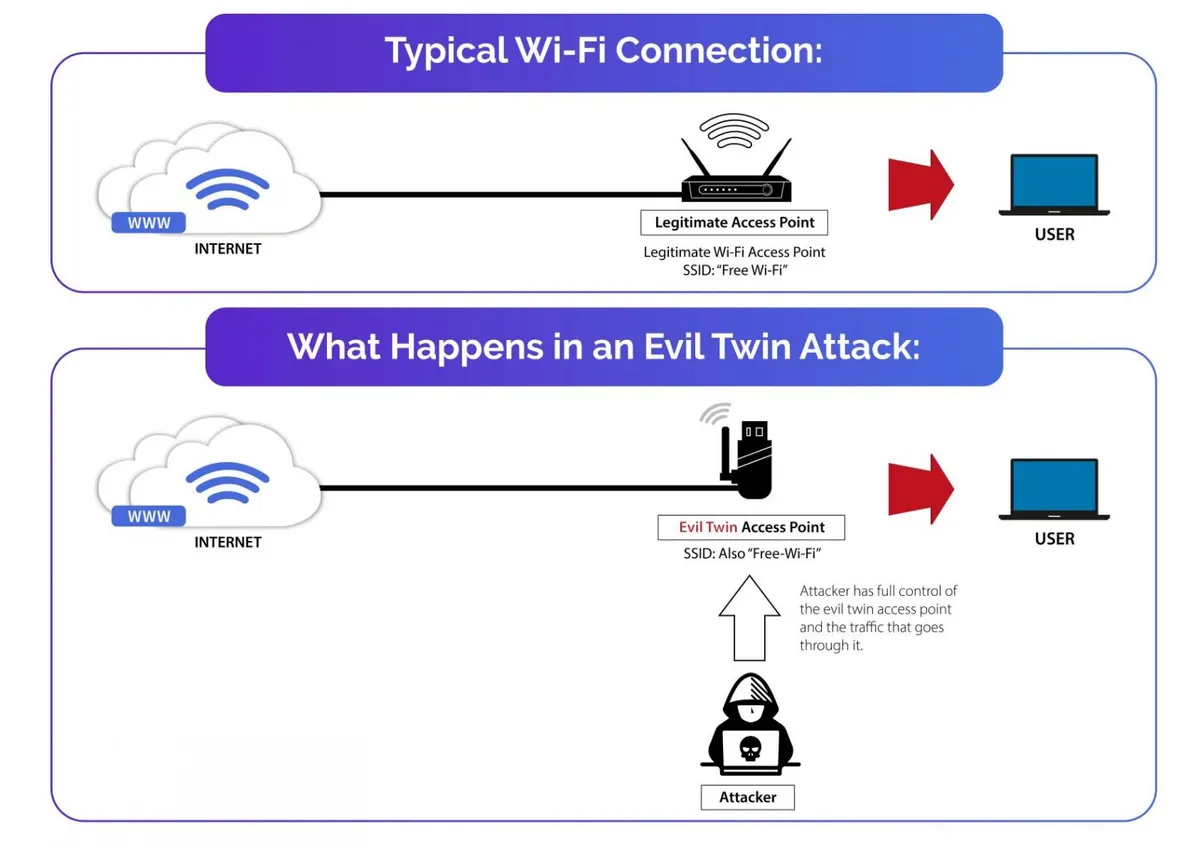
In an evil twin attack, a hacker deliberately creates a Wi-Fi network carrying the same name, or SSID, as a genuine one, and sometimes the same MAC address too, so that people join it by mistake. It is the wireless counterpart of a phishing scam.
After a victim joins the fake network, the attacker can listen in on and watch all internet traffic flowing to their laptop, phone or other device. From there the attacker can run phishing attacks, harvest login credentials and other sensitive information, push malware onto the device and even plant a backdoor on it.
Victims frequently never realise what has happened, because joining an evil twin feels exactly like joining any other wireless network. What changes is that, from then on, the hacker can follow and even control everything they do online. Should the victim sign in to a bank or email account that is not secured, for example, the attacker can capture both the login details and the transactions, since every piece of traffic passes through the attacker's own device.
How the fake network is set up
The hacker first picks the Wi-Fi network or hotspot to imitate. They then build a counterfeit wireless access point (AP) that uses the identical name, a name very close to it, or one designed to lure people in, such as "Free Wi-Fi". Open networks are especially attractive targets, because devices can join them automatically with no password needed.
How to protect yourself
Staying safe starts with care on public Wi-Fi and a refusal to join networks that are unfamiliar or look suspicious. Where possible, check with the owner of the premises that the network is the real one. Other precautions help as well: stick to HTTPS sites, use a VPN to encrypt traffic so that sniffing and snooping attempts fail, and turn on multi-factor authentication so accounts stay protected even if a password is stolen.
The surest defence of all, though, is simply to stay off public networks.